Azure Firewall East-West Idle Timeout: Why 5 Minutes Can Fail Silently

TL;DR — Azure Firewall east-west TCP idle timeout is documented as fixed at 5 minutes and cannot be raised. Unlike north-south flows, Azure Firewall does not send a TCP RST when an east-west flow times out. The application-side symptom is a silent half-open connection that only becomes visible when traffic resumes. In a quiet lab the documented eviction is not deterministically reproducible on AFW Standard with a single flow; under production load (state-table pressure, autoscale events, asymmetric routing) it almost certainly is. Either way, configure keepalives below 5 minutes and design reconnect logic into the application.
Microsoft’s TCP session behaviour reference for Azure Firewall states this plainly: for east-west traffic, the idle TCP timeout is fixed at 5 minutes and cannot be modified. The page goes further and warns that Azure Firewall does not send a TCP RST when an east-west idle timeout occurs, which is one of the reasons long-lived idle connections can appear to “just stop working” without an obvious termination signal. The recommended mitigation is application-level or OS-level TCP keepalives at 30-second intervals.
| Property | North-south flows | East-west flows |
|---|---|---|
| Default idle TCP timeout | 4 minutes | 5 minutes |
| Configurable | Up to 30 minutes via Microsoft support | Fixed, not modifiable |
| RST emitted on eviction | Yes | No |
The no-RST behaviour on east-west is the load-bearing detail. It means an evicted connection does not produce an unambiguous “connection closed” signal at either endpoint. Both sides keep their socket in ESTABLISHED until the next data packet, which the firewall sees as belonging to an unknown flow and stamps INVALID. The application notices only at the next write or read — which can be minutes or hours after the actual eviction.
That sounded familiar. Our team had been investigating intermittent SAP GUI disconnects through an Azure Firewall Standard, and a forensic look at AZFWFlowTrace logs showed roughly 1500 INVALID flag events on native SAPGUI ports (3200, 3300) in a two-hour window. INVALID in flow trace means the firewall observed a packet for a TCP flow whose state it no longer holds. The documented 5-minute idle timeout fit the pattern: a flow goes idle, the firewall silently evicts the state at the 5-minute mark, the next application packet arrives, the firewall has no record of the connection, and the packet gets stamped INVALID.
It is a tidy story. I was ready to write it up as the root cause and recommend lowering SAP’s rdisp/keepalive parameter below the 5-minute threshold. The problem is that when I tried to reproduce the behaviour in a controlled lab, it would not happen.
Why Build a Lab At All
Before changing a production parameter on a critical application, it is worth confirming you understand the mechanism. SAP rdisp/keepalive is a system-wide setting on the SAP application server. Changing it from 1200 seconds (the typical default) to 240 seconds means every connected SAP GUI session generates additional keepalive traffic, every minute, for every user. The cost per connection is negligible but the change touches a load-bearing parameter on a system with thousands of concurrent sessions, and it triggers an SAP basis approval process.
That kind of change deserves more than a documentation citation. I wanted packet-level proof that Azure Firewall was the active cause of the disconnects before recommending a workaround.
The Reproduction Lab
The lab is intentionally minimal. Two Ubuntu 22.04 VMs in separate VNets in a sandbox subscription, both peered to a hub VNet that carries an Azure Firewall Standard instance. A UDR on each spoke forces traffic to the other spoke through the firewall’s private IP. A dedicated network rule allows TCP/12345 between the two /28 subnets, plus ICMP for sanity checks.
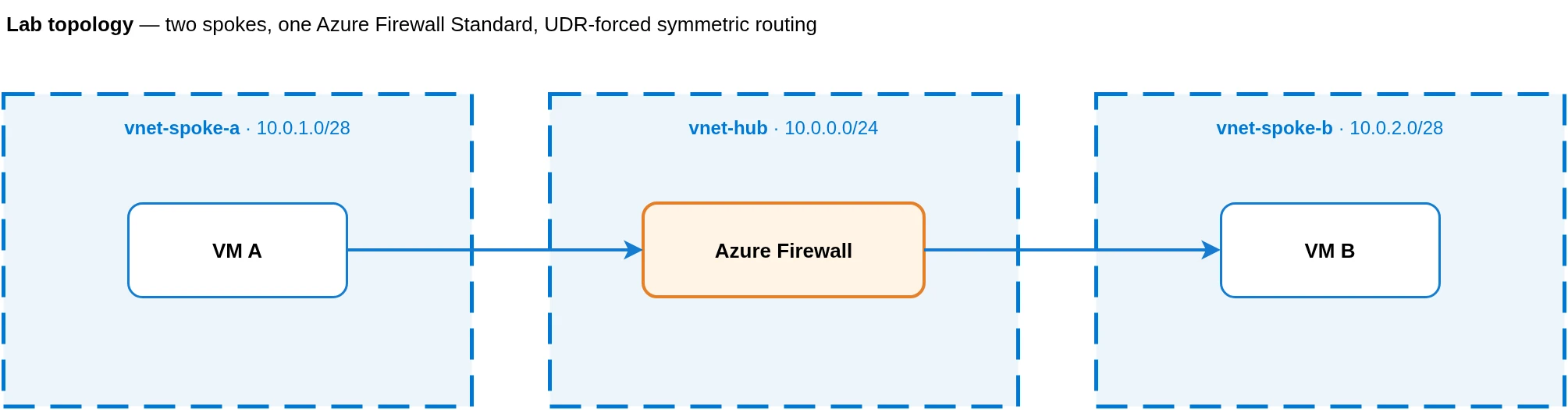
VM A acts as the client. VM B runs a small threaded Python echo server on :12345. The client opens a TCP connection, sends one line, waits N seconds in time.sleep(N), then sends a second line and reads the echo. If the connection is still alive after the idle window, the echo comes back. If the firewall has dropped the flow state, the second send either gets a RECV empty (peer closed) or a hung read.
The measurement only counts if the socket is genuinely silent during the idle window. The Python socket had no SO_KEEPALIVE enabled, and the script did nothing on the socket during the sleep. Linux’s net.ipv4.tcp_keepalive_time defaults to 7200 seconds, but it only fires when SO_KEEPALIVE is set on the socket, so kernel-level keepalives were not in play either. I was measuring genuinely silent idle.
Each client run opens many connections in parallel, each with a different idle duration. With staggered probe times you get a clean grid of “idle seconds → did the echo come back?” data points in one wall-clock window. tcpdump runs in parallel on both VMs, filtered to port 12345, so every packet on the wire is recorded.
AZFWFlowTrace on the firewall side captures the firewall’s view of each flow: SYN-ACK, FIN, RST, INVALID flags. Activating it requires Dedicated-mode diagnostic settings and the AFWEnableTcpConnectionLogging subscription feature flag, plus a tag-touch on the firewall to apply the change. Microsoft’s monitoring reference covers the pieces but does not walk through them as a single procedure.
The Bug That Nearly Produced a False Positive
My first run tested idle durations from 60 to 420 seconds. Every connection succeeded. That seemed to refute the 5-minute claim, but it could also mean nothing was idle long enough to trigger eviction.
On the second run I extended the scale: 60, 600, 900, 1200, 1500, 1800, 2400, 3000, 3600 seconds. Now there was a pattern. The 60-second and 600-second probes succeeded; everything at 900 seconds and above came back as RECV empty (peer closed). The cutoff looked like it sat somewhere between 600 and 900 seconds. Roughly 15 minutes, not 5.
A third run did a tight scan between 600 and 900 seconds. Surprisingly, every probe in that range succeeded, including the 900-second one. So the boundary was apparently above 900 seconds. I ran a fourth round, this time with the original wide scale but with tcpdump enabled to confirm which side initiated the close.
The pcap was decisive. On the 1200-second connection, the client saw a FIN arrive from the server’s IP. The server’s own pcap showed the FIN being emitted outbound from its kernel. The application code on the server never called close. Nothing arrived on the wire that would have triggered the kernel to close. And the timing was exact: the FIN went out at precisely 900.048 seconds after the last inbound ACK from the initial echo.
I went back to the server script. The handle function looked like this:
def handle(conn, addr):
    log(f"ACCEPT from {addr}")
    try:
        conn.settimeout(900)  # 15 min, well over any AFW idle we want to test
        while True:
            data = conn.recv(4096)
            if not data:
                return
            ...
The conn.settimeout(900) call set a 15-minute idle timeout on recv. After 900 seconds of no inbound data, the Python socket raised socket.timeout. The finally clause closed the connection. The kernel emitted a FIN. The client, probing at 1200/1500/1800 seconds, hit the closed socket and read zero bytes, which surfaced as RECV empty (peer closed).
My server was the killer. Not the firewall.
The comment in that line (“well over any AFW idle we want to test”) is darkly funny in retrospect: when I wrote it, I expected the AFW to fire at 5 minutes, so a 15-minute server timeout looked like a comfortable safety net. When the AFW failed to fire, my “safety net” became the only thing actually closing connections, at exactly the time I expected the firewall to.
What the Lab Actually Measured
With the settimeout(900) removed and recv blocking indefinitely, I re-ran the full scale: 60, 600, 900, 1200, 1500, 1800 seconds, with duplicates at each idle value to detect non-determinism. Every connection succeeded. The 1800-second probe (30 minutes of total wire silence) came back with the echo, RTT effectively zero, just like the 60-second probe.
A pcap on a 1200-second connection now showed thirteen packets total across the entire connection lifetime: three for the handshake, four for the initial echo, three for the post-idle echo, three for the graceful close. Twenty minutes of dead air on the wire between the seventh and eighth packets. AZFWFlowTrace logged the connection at SYN-ACK and again at the FIN exchange; zero INVALID, zero RST.
I also ran a second test where I deliberately fired a control-plane PATCH on the firewall mid-idle (an az network firewall update --set tags.foo=ts<timestamp> to force the firewall to re-evaluate its resource state). Ten connections were idling at 1200 seconds; at the 600-second mark the PATCH succeeded; at the 1200-second mark every single one of them received its echo. AFW control-plane updates do not appear to evict in-flight idle state either.
The conclusion is uncomfortable: on AFW Standard, in a quiet lab, east-west TCP flows survive at least 30 minutes of complete silence, and a tag-level configuration update does not knock them down. The 5-minute timeout that Microsoft documents is either not active in this scenario, or it activates under conditions the lab does not reproduce.
What Could Explain the Documentation Then
Microsoft’s documentation is rarely wrong about hardcoded protocol behaviour. The 5-minute east-west idle timeout almost certainly exists; the question is what triggers it.
The most likely candidate is state-table pressure under load. Azure Firewall instances have finite connection-tracking capacity, and in a sandbox firewall handling ten flows there is no pressure to evict anything. On a production firewall holding tens of thousands of concurrent flows, the eviction heuristic plausibly kicks in earlier and surfaces as the documented 5-minute behaviour. The docs may be describing the worst-case bound that only becomes visible once the state table is busy.
Autoscale events are another plausible trigger. Azure Firewall autoscale documentation confirms the service scales out under throughput pressure, and new instances do not inherit the old instances’ tracked connections. Scale events happen routinely on a busy firewall. In a lab with effectively zero throughput, they do not happen at all.
Asymmetric routing is harder to engineer accidentally in a lab but easy to hit in production. If a flow’s return path traverses a different firewall instance than the forward path (after a scale event, or via a misconfigured UDR), the second instance has no state for that flow and stamps any subsequent packet as INVALID. My lab’s symmetric routing through a single-instance firewall removes this variable.
SAP DIAG protocol behaviour is a separate possibility. SAP GUI uses DIAG on ports 3200 and 3300, with its own message framing and connection cadence that may interact with stateful tracking in ways a vanilla TCP echo does not exercise. The lab cannot reproduce this and I have not yet found a way to model it cleanly.
For an environment where the documented 5-minute behaviour actually manifests, you need to provoke at least one of these conditions. The “quiet lab” disproves the universal-and-deterministic version of the claim. It does not disprove that the timeout exists under realistic production conditions.
Mitigation Regardless of Mechanism
The fix is the same whether the documented 5-minute behaviour is deterministic or pressure-driven. For east-west flows through Azure Firewall, do not rely on long silent TCP sessions.
Configure application-level or OS-level TCP keepalives at intervals well below the documented 5-minute boundary. Microsoft recommends 30 seconds, which gives enough headroom for jitter and brief loss. Build reconnect logic into the client so a half-open detection triggers a fresh connection instead of a hang, and so an INVALID-stamped packet does not become an end-user error.
Linux defaults are too generous for this scenario. net.ipv4.tcp_keepalive_time is 7200 seconds out of the box, which only matters if SO_KEEPALIVE is set on the socket in the first place. Most application stacks do not enable it by default. Set the socket option explicitly and tune the kernel idle to 240 seconds or lower for services that hold long-lived east-west TCP.
For new architecture, prefer designs that avoid silent long-idle TCP through a central firewall: VNet integration, private endpoints, or messaging-based contracts (Service Bus, Event Grid) sidestep the problem entirely. Where the long-idle TCP is non-negotiable (SAP GUI, certain client-server protocols), assume east-west idle eviction will happen at some point under load and build for it.
Lessons For Anyone Running This Test
Three practical takeaways from this exercise.
First, the bug in the server script is the kind of mistake that is easy to make and hard to catch without packet capture. When two pieces of infrastructure could both plausibly close a connection at a similar time, you need wire-level evidence to know which one actually did. The pcap timestamp matching the settimeout(900) value to the millisecond is what made the diagnosis unambiguous. Without tcpdump, I would have published “AFW evicts east-west idle around 15 minutes” as a finding and been wrong in print.
Second, the AZFWFlowTrace activation procedure is genuinely awkward. The feature is gated behind a subscription feature flag, the diagnostic setting must be in Dedicated mode (not the default AzureDiagnostics mode), and the firewall needs a control-plane touch to activate the change. If you are planning to use flow trace data for any non-trivial investigation, allow extra time for the activation dance.
Third, a sandbox firewall is not a faithful model of a production firewall. The behaviours that matter under load (state-table pressure, scale events, instance churn) cannot be reproduced by ten quiet connections in a quiet subscription. If the documented behaviour requires production-grade conditions to manifest, your reproduction lab needs to provoke those conditions. That is a much larger build than the one described here, and it is the natural next step for anyone who wants to nail down what is actually happening on a busy production AFW.
What This Lab Proves and Does Not Prove
| Lab observation | Safe conclusion |
|---|---|
| No TCP RST observed during or after the idle period | Expected: Azure Firewall does not send RST on east-west idle timeout |
| Both endpoints unaware during silence | Consistent with the documented silent half-open failure mode |
| Single quiet flow survived 30+ minutes on AFW Standard | Disproves the universal-deterministic 5-minute version, not the timeout itself |
| Microsoft docs: east-west idle = 5 min, fixed, no RST | Treat 5 minutes as the design boundary regardless |
| Lab does not produce state-table pressure or autoscale events | The documented behaviour likely requires production-grade load to manifest |
| Documented mitigation: keepalives at 30-second intervals | Apply this whether you can reproduce the timeout or not |
Where This Leaves The Original SAP Question
For the specific SAP GUI investigation, the lab result changes the recommendation but does not refute the workaround. The 1500 INVALID events in production are real. The mechanism is not the simple “5-minute idle on a quiet flow” that the documentation implies, but something that requires production conditions to manifest. Until I can reproduce it under load, I cannot say whether the cause is state pressure, autoscale, asymmetric routing, or SAP-specific framing.
Lowering rdisp/keepalive below 240 seconds remains a valid mitigation regardless of the underlying mechanism, because any idle-based eviction (deterministic or pressure-driven) is short-circuited by frequent keepalive traffic. It is the cheap belt-and-braces fix while the root cause investigation continues. The difference now is that I will recommend it as a workaround for an unconfirmed mechanism, not as a fix for the specific documented behaviour, and I will be honest about that distinction with the SAP team.
If you are reading this because you are hunting an INVALID-flag storm of your own, my advice is the same: build a lab, but expect the lab to surprise you, and look at the wire before you trust the application-level signals. The interesting failures hide between the layers, and only a packet capture can tell you which layer actually broke.
Further reading on Azure Firewall design:
- Azure Firewall in 2026: Standard vs Premium, and When It Replaces an NVA — current SKU decision framework, including the east-west idle constraint discussed here.
- Azure Firewall: When Cloud-Native Network Security Finally Makes Sense — foundational hub-spoke architecture and operational basics.
- Shared vs Separate Azure Hubs for NIS2 and DORA — when regulatory requirements affect firewall topology decisions.